REFLECTIONS

SOMETHING about ANYTHING may not be EVERYTHING but definitely GOODTHING

Tuesday, January 20, 2009

HOW TOUCH SCRENS WORKS

A basic touchscreen has three main components: a touch sensor, a controller, and a software driver. The touchscreen is an input device, so it needs to be combined with a display and a PC or other device to make a complete touch input system.

1. Touch Sensor
A touch screen sensor is a clear glass panel with a touch responsive surface. The touch sensor/panel is placed over a display screen so that the responsive area of the panel covers the viewable area of the video screen. There are several different touch sensor technologies on the market today, each using a different method to detect touch input. The sensor generally has an electrical current or signal going through it and touching the screen causes a voltage or signal change. This voltage change is used to determine the location of the touch to the screen.

2. Controller
The controller is a small PC card that connects between the touch sensor and the PC. It takes information from the touch sensor and translates it into information that PC can understand. The controller is usually installed inside the monitor for integrated monitors or it is housed in a plastic case for external touch add-ons/overlays. The controller determines what type of interface/connection you will need on the PC. Integrated touch monitors will have an extra cable connection on the back for the touchscreen. Controllers are available that can connect to a Serial/COM port (PC) or to a USB port (PC or Macintosh). Specialized controllers are also available that work with DVD players and other devices.

3. Software Driver
The driver is a software update for the PC system that allows the touchscreen and computer to work together. It tells the computer's operating system how to interpret the touch event information that is sent from the controller. Most touch screen drivers today are a mouse-emulation type driver. This makes touching the screen the same as clicking your mouse at the same location on the screen. This allows the touchscreen to work with existing software and allows new applications to be developed without the need for touchscreen specific programming. Some equipment such as thin client terminals, DVD players, and specialized computer systems either do not use software drivers or they have their own built-in touch screen driver.


Touchscreens Add-ons and Integrated Touchscreen Monitors

We offer two main types of touchscreen products, touchscreen add-ons and integrated touchscreen monitors. Touchscreen add-ons are touchscreen panels that hang over an existing computer monitor. Integrated touchscreen monitors are computer displays that have the touchscreen built-in. Both product types work in the same way, basically as an input device like a mouse or trackpad.


Touchscreens As Input Device

All of the touchscreens that we offer basically work like a mouse. Once the software driver for the touchscreen is installed, the touchscreen emulates mouse functions. Touching the screen is basically the same as clicking your mouse at the same point at the screen. When you touch the touchscreen, the mouse cursor will move to that point and make a mouse click. You can tap the screen twice to perform a double-click, and you can also drag your finger across the touchscreen to perform drag-and-drops. The touchscreens will normally emulate left mouse clicks. Through software, you can also switch the touchscreen to perform right mouse clicks instead.

Tuesday, January 13, 2009

MAESTERO AR REHMAN WINS GOLDEN GLOBE!

10-a-r-rahman-100109

AR Rehman does what Amitabh, Shah Rukh, Amir, Salman or no Indian has done before. January 11th 2009 Rehman was awarded a Golden Globe Award for best original score in a motion picture, for Slumdog Millionaire. Rehman has produced some outstanding music for Slumdog, including the popular “Jai Ho” sung by Sukhwinder Singh and the famous “Paper Planes” sung by MIA. For those that are not familiar with the Golden Globes, they are considered the most prestigious awards after the Oscars.


Tuesday, December 16, 2008

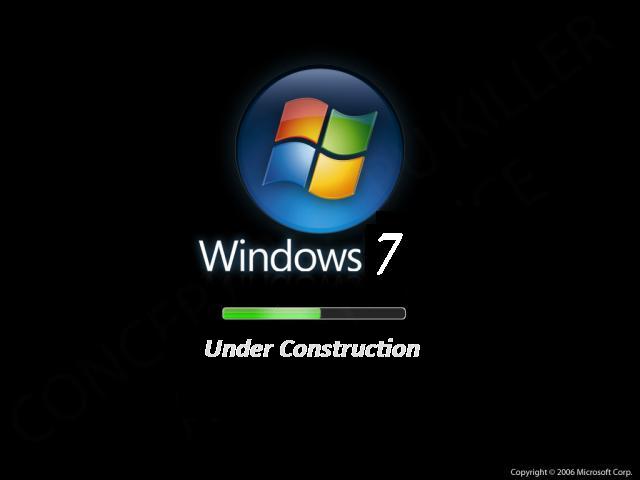
FEATURES OF WINDOWS 7

http://www.stealthcomputer.com/blog/wp-content/uploads/2008/04/windows_7.jpg


Microsoft is making major functional changes to Windows 7, and it's making a wide number of much smaller changes as well. It's still early, but based on early pre-beta builds of Windows 7 and reports published online, the following changes are coming (in no particular order).

Major changes

Kernel. Windows 7 will feature an evolved kernel and underpinnings when compared to its previous-generation predecessors, Windows Vista with Service Pack 1 (SP1) and Windows Server 2008. While it's unclear whether the "MinWin" kernel that Microsoft demonstrated in 2007 will be included with Windows 7, it is quite likely that the OS will include parallel processing capabilities, which will be implemented as .NET Framework 4.0 APIs.

Virtualization. With Windows Server 2008 now shipping with hypervisor-based virtualization capabilities, it's obvious that this technology will be making its way to the Windows client as well. Will it happen in time for Windows 7? Yes, it probably will. But Windows 7 will natively support the VHD virtual hard drive format utilized by Virtual PC and Hyper-V regardless.

Sensors. Windows 7 will include context-aware application support via a new "sensors" facility. One example: A location sensor can tell "where" your PC is and compatible applications can act accordingly. Applications can use sensor information to offer customized and enhanced services, according to Microsoft's documentation. Because of the privacy implications of sensors, this feature is opt-in and highly configurable.


Screenshot courtesy of Winfuture.de

User Account Control improvements. Windows Vista's most reviled feature is being completely overhauled to be more customizable. Four settings will be available:

1. Never notify (least secure). The user is not notified when a program tries to install software or make changes to the computer. The user is not notified when they make changes to Windows settings or when programs try to do so. 2. Only notify me when programs try to make changes to my computer. The user is not notified when a program tries to install software or make changes to the computer. The user is not notified when they make changes to Windows settings. However, the user is notified when programs try to make changes to the computer, including Windows settings. 3. Always notify me. The user is notified when a program tries to install software or make changes to the computer. The user is also notified when they make changes to Windows settings or when programs try to do so. 4. Always notify me and wait for my response (most secure). The user is notified when a program tries to install software or make changes to the computer. The user is also notified when they make changes to Windows settings or when programs try to do so.


Screenshot courtesy of Winfuture.de

Improved "Day One Experience." Microsoft wants Windows 7 to be useable and exciting "out of the box," and it's improving the experiencing of running this new OS for the first time. This will include an even more streamlined Setup routine and a thoroughly overhauled user interface.

Scenic application user interface. Microsoft has created a new application UI, codenamed Scenic, that will give Windows 7 applications a new and consistent, but customizable, look and feel.

Libraries. Special shell folders (Documents, Pictures, Music, and so on) are being renamed to Libraries. Note, however, that WinFS will not be implemented in Windows 7 and these locations will still occur within the normal shell namespace.

Tweaked Explorer. Windows Explorer is being updated again with a number of new features, including a resizable search box, a simpler new toolbar (with none of the color-coding found in Windows Vista), and a new icon view style called Content. This Content view style is most likely a preview mode for images and other rich content.


Screenshot courtesy of Winfuture.de

Accelerators for Windows. Based on the Accelerators feature from Internet Explorer 8, Windows 7 Accelerators provide a way for learning more about selected text, optionally using voice control. Here's how it works: Anywhere in the Windows 7 UI, you can select text and speak commands through a microphone, or, right-click and choose from a list of options. Supported Accelerators include "Blog with Windows Live Spaces," "Define with Encarta," "Email with Live Mail," "Map with Live Maps," "Search with Live Search," and "Translate with Windows Live." Default voice shortcuts include such things as "Add to Calendar," "Blog," "Email," "Find People," "Go There," "Search," "Share," and many others.


Screenshot courtesy of Winfuture.de

Multi-touch. Windows 7 will include integrated support for multi-touch displays and support the "Surface" multi-touch technologies. This is an evolution of the Tablet PC and touch technologies supported by previous Windows versions.

Fewer bundled applications, more control over those applications that are installed. Thanks to antitrust lawsuits from around the world, Microsoft is moving more applications out of Windows and making them optional installs through the Windows Live service. Windows 7 will no longer include Windows Mail, Windows Photo Gallery, or Windows Movie Maker. However, Microsoft is also adding end-user (and admin) support for full system customization, so you can control which applications are and are not installed in the OS. Finally.

No more Sidebar. Microsoft is removing Windows Sidebar from Windows 7, but the Windows Gadgets infrastructure remains and will be expanded. In Windows 7, Gadgets can only be viewed on the desktop. As such, the Gadget Gallery found in Windows Sidebar will be globally available and renamed to Desktop Gadget Gallery.

Windows Solution Center. Microsoft is replacing Windows Security Center with a new utility called Windows Solution Center. In addition to monitoring Windows Firewall, Automatic Updating, virus and spyware protection, Internet security settings, and User Account Control, Windows Solution Center will also monitor PC maintenance, backup, troubleshooting, Network Access Protection (NAP), and more.


Screenshot courtesy of Winfuture.de

HomeGroup networking. Microsoft had tried to get its "Castle" networking scheme into Windows Vista, but the feature will finally appear in Windows 7 as HomeGroup. Essentially a combination of workgroup networking with file and media sharing, HomeGroup makes it easier to create a home network where PCs share pictures, music, videos, documents, printers, and other resources with each other.


Screenshot courtesy of Winfuture.de

Minor changes

Background tasks. Windows 7 will include a new infrastructure for enabling more efficient background tasks.

Internet Explorer 8. Windows 7 will include the latest version of Microsoft's Web browser.

Windows Media Player 12. Windows 7 will include a new version of Windows Media Player.

Windows Media Center. Windows 7 will include a new version of Windows Media Center.

Microsoft Paint. Windows 7 will include a dramatically improved version of Microsoft Paint, the most dramatic upgrade to this software since the first versions of Windows.


Screenshot courtesy of Winfuture.de

Microsoft WordPad. WordPad gets the Scenic ribbon treatment in Windows 7 and becomes a full-feature word processor again.


Wallpapers. Windows 7 will include new wallpaper background images.

Biometric control panel. Windows 7 will natively support biometric devices like fingerprint readers.

Games Explorer. Windows 7 will include an updated version of the Games Explorer and will now optionally scan for game updates and notify the user when they're available. You will also be able to manually look for individual game updates by right-clicking the game's icon in Games Explorer and choosing "Scan for Update."


Screenshot courtesy of Winfuture.de

ClearType Text Tuner. Windows 7 will include a ClearType Text Tuner for fine-tuning the quality of text through the operating system.

Windows Mobile Device Center. Previously a free, separate download, Windows Mobile Device Center will be included with Windows 7.

Workspaces. Windows 7 will support multiple virtual desktops, or workspaces, which are managed via a new Workspaces Center.

Troubleshooting control panel. A new Troubleshooting control panel provides a central location for troubleshooting applications, devices, networks, printing, the display, sound, performance, and other Windows features.

Minor tweaks and improvements all around. Virtually no end user functionality in Windows is untouched, with minor tweaks and improvements to everything from the Start Menu, desktop, and taskbar to Windows Update.

WHO Deserves MORE?

Picture (Metafile)
The India cricket team bus. & DON'T MISS the VIJAY RATH
Picture (Metafile)

Now lets have a look at the luxury our commandos had after their 60 hr sleepless battle!!!
Picture (Metafile) Picture (Metafile)
Picture (Metafile)

The Black Cat (NSG) commando bus after operation at TAJ .

WHICH VICTORY WAS CRITICAL ??

What a shame and disgrace to every citizen of India that the elite NSG
Force was transported into ordinary BEST buses,
whereas our cricketers are transported into state of the art
luxury buses, these Jawans lay down their lives to protect every
Indian and these cricketers get paid even if they lose a match,
we worship these cricketers and forget the martyrdom of these brave Jawans.
The Jawans should be paid the salaries of the cricketers
and the cricketers should be paid the salaries of the Jawans.


Huh... This is
our India....
Please be a human being and forward this to everyone u know.

Do not worry about those who have come thru boats...
Our forces can easily defeat them.
WORRY about those who have come thru votes....
Those are our REAL ENEMIES.. ,

Guys lets utilize our votes sensibly , that's the least we can do.
Jai Hind.

Tuesday, November 25, 2008

INSPIRING PHOTOS


Binary Star Explosion Inside Nebula Challenges Star Theory


The explosion of a binary star inside a planetary nebula has been captured by a team led by UCL (University College London) researchers – an event that has not been witnessed for more than 100 years. The study, published in Astrophysical Journal Letters, predicts that the combined mass of the two stars in the system may be high enough for the stars to eventually spiral into each other, triggering a much bigger supernova explosion. The new nova, known as V458 Vulpeculae, provides an important test for models of how stars evolve. Our analysis also suggests that the combined mass of the two stars which produced the explosion could be high enough that eventually, the two stars will spiral into each other, producing a much larger supernova explosion. The role of novae as potential future supernovae has thus far been difficult to analyse in detail, and so V458 Vul provides an opportunity to learn more about this aspect of stellar evolution.”
(via science daily)

Monday, November 24, 2008

Sunday, November 23, 2008

Saturday, November 22, 2008

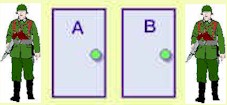
Puzzle: Life door or Death door


There is a prisoner who is about to be executed. The king decides to give him one last chance to live.

There are 2 doors, the life door and the death door. There is one guard standing by each door. Those two guards know which door is the life door and which is the death door. However, one of them always tells the truth and the other always tells a lie. There is no way you can identify which door is the life door or the death door. There is no way you can distinguish who is the one telling the truth.

The prisoner can only ask one guard one question. Then he needs to choose a door to walk in. If he walks in the death door, then he will be executed. If he walks in the life door, he can have a new life.

He did choose the life door and lived. What was the question he asked? How did he choose the door after he got the answer from one of the guards?

(Answer in comments)

Friday, November 21, 2008

Sony rolls out a bunch of new headsets


(IMAGE SOURCE)

The wireless DR-BT160AS Bluetooth Active Style Headphones as shown above target those who lead an extremely active lifestyle, staying in place regardless of whether you work out, walk, run or do anything active while listening to music. Apart from dispensing audio, it also has an integrated microphone that allows you to carry out a conversation as well. With its ultra secure fit adjustable earpiece shaft, you can be sure that it will remain in place no matter how vigorous your workout is.

Thursday, November 20, 2008

Monday, November 17, 2008

ROME WAS BUILT AGAIN BUT THIS TIME ALSO NOT IN A DAY!


OF COURSE ALL ROADS MAY LEAD TO ROME BUT THE RIGHT WAY IS google

JUST FOR CHANGE


Saturday, November 15, 2008

The Tricolour on the moon


ndia is officially on the moon. After a couple of tense moments, the Lunar Impact Probe which was launched by the Chandrayaan planted the Tricolour on the moon at 8.31pm. ncidentally this proud day for India coincides with Children's day which makes it even more special. India becomes the fourth nation after the US, Russia [Images] and ESA to have the national flag painted on the moon. The moment of pride was very obvious at the ISRO Telemetry, Tracking and Command Network (ISTRAC) at Peenya, Bangalore.
(via redif)

WEALTH, WISDOM OR BEAUTY

An angel appears at a faculty meeting and tells the dean that in return for his unselfish and exemplary behavior, the Lord will reward him with his choice of infinite wealth, wisdom, or beauty.

Without hesitating, the dean selects infinite wisdom.

"Done!" says the angel, and disappears in a cloud of smoke and a bolt of lightning.

Now, all heads turn toward the dean, who sits surrounded by a faint halo of light. At length, one of his colleagues whispers, "Say something."

The dean sighs and says, "I should have taken the money."
(collected)

BlackBerry Curve 8900 ; QWERTY phones from 2009


While touch-screen phones may be more charming and better at multi-media, they can never replace the accuracy and ease of a buttoned keyboard. Thus when it comes to punching out long e-mails or instant messages to friends on the move, a hardware QWERTY phone can be of benefit to you.


Previously, QWERTY phones would only be seen in the hands of business professionals as the devices had a "more work and less play" functionality. But all that is changing now, we're seeing the new wave of QWERTYs that can work and play equally well. It's almost the end of the year, and if you plan to save and buy a QWERTY phone early next year, here's a list of models for the year 2009 that you should watch out for.
(via techtree.com)

Friday, November 14, 2008

Evolution of dance by comedian judson Laipply

YouTube video of Judson Laipply the Inspirational Comedian has had over 100+ million hits. see and enjoy All in One

Wednesday, November 12, 2008

GANGULY RETIRES


(GANGULY AND SACHIN WITH FAMILIES)

A flawless player on the off-side, an aggressive captain, someone who groomed a lot of youngsters and one of the all time greats of Indian cricket Saurav Ganguly will surely be missed by his fans for a long time to come.
(AT THE AGE OF 5)